NursingPathshala · Study App
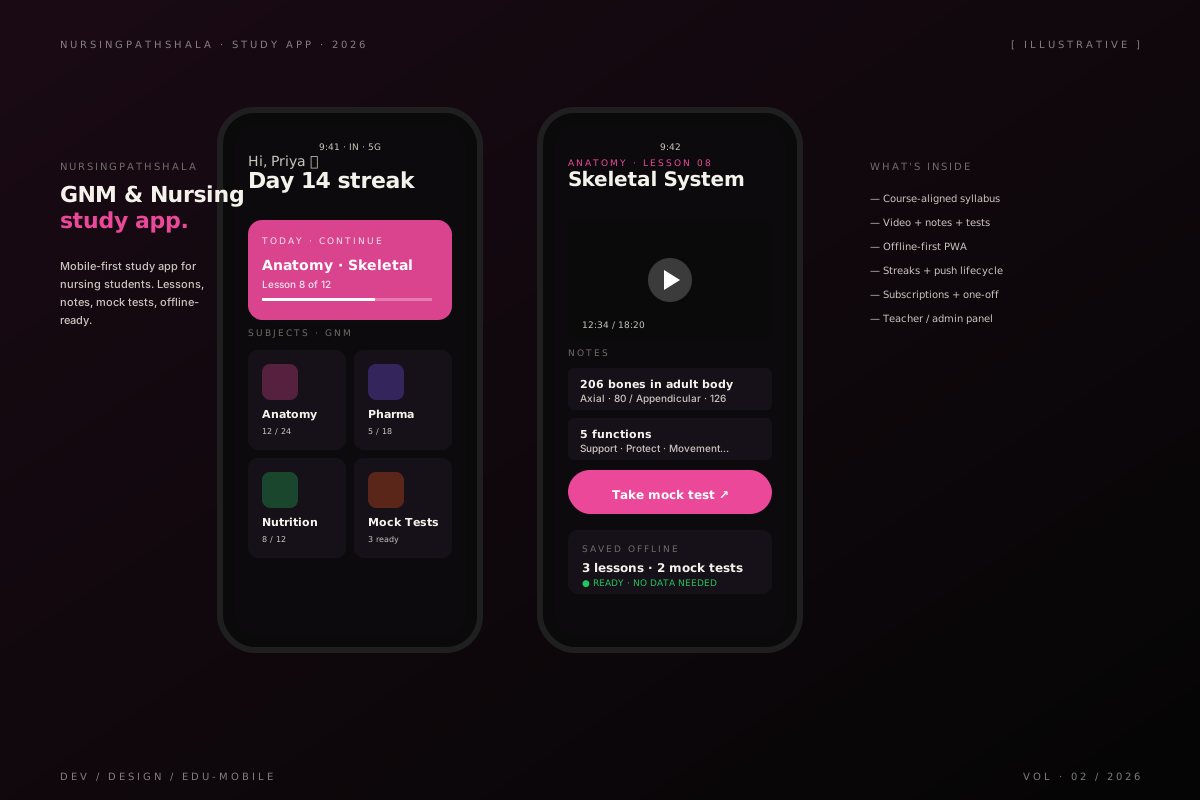
A study app for GNM and nursing students — courses, notes, mock tests, and exam prep in one mobile-first product.
The patchwork students were already using
GNM and nursing students in tier-2 and tier-3 cities were studying off a patchwork: a photocopied textbook a senior gave them, a half-functional PDF on a sister’s WhatsApp, a YouTube channel run out of someone’s bedroom, and — for the lucky ones — a paid course that buffered for ten seconds every minute.
The patchwork worked, kind of. It was free or cheap. But it was also unorganized, unsearchable, and impossible to study from on a phone. The students who passed weren’t passing because of the system — they were passing in spite of it.
The brief I gave myself
The official brief was “build the study companion they wished existed.” The real brief, after a week of talking to actual nursing students, was sharper:
A mobile-first product they can use on a ₹6,000 phone, on 3G, in their hostel room with one bar of signal, that costs less than the textbooks they’re already buying, that organizes the entire GNM syllabus in one place.
That single constraint — on the phone they already have, on the network they already have — made every later decision easier.
Why a PWA, not a native app
The standard advice in 2026 is “build native.” Better performance, better device APIs, better app-store presence. All true.
The standard advice is also wrong for this audience. Nursing students on entry-level Android phones already have storage anxiety — they uninstall apps to take photos. The friction of “go to the Play Store, search, install, accept permissions, sign in” is enormous for an audience that arrived at our product through a WhatsApp link from a senior. Half of them would never make it past the install step.
A PWA solves this. The first lesson loads in the browser. If the student likes it, the app prompts to install — and “install” means adds an icon to the home screen with no Play Store, no permissions dialog, no 50MB download. The bounce rate at the install step dropped to almost nothing once we made install optional and progressive.
Native would have given us better push reliability. The PWA gave us users.
How the content is structured
The syllabus is the spine. Every piece of content — a video, a note, a mock-test question — is tagged to a syllabus node. That means when a student opens the app, they don’t see “all our content” (overwhelming). They see “what’s next in your syllabus” (manageable).
We also built three modes of consumption, because students study in three different states:
- At a desk with wifi: long lessons, video, attached notes
- On the bus with 3G: short notes, no video, queued for later
- In bed with no signal: anything they downloaded, mock tests they cached
The app picks the right mode automatically based on connection and history. We don’t ask the student to switch modes — most won’t. We infer the mode and choose for them.
What I shipped
- Course content organized to match the GNM and B.Sc Nursing syllabus, with every node mapped to lessons, notes, and mock tests
- Mobile-first PWA with offline-aware lesson playback (downloads cache in IndexedDB, work without signal)
- Mock-test surface with timed practice and a question bank that grows weekly
- Streaks, daily push reminders, and a small lifecycle messaging engine that nudges students toward the mock test on the morning of their exam
- Subscription billing for unlimited access, plus à-la-carte purchases for printed material
- A teacher / admin panel for content uploads, schedule changes, and student progress
- A lightweight student progress dashboard so teachers can see who’s falling behind
Tech notes
- React + TypeScript PWA with a small service worker for offline
- IndexedDB for the offline content cache — videos, PDFs, and serialized lesson state
- Push notifications via the web push protocol — iOS support is finicky but workable
- Razorpay for subscriptions and one-time payments (the right rail for the Indian market)
- Firebase for the teacher panel — chosen because the editing surface is small and we wanted velocity, not control
- A simple analytics pipeline that logs lesson completion + mock-test performance for each student
What was harder than it looked
Push notifications on iOS. Apple added web-push support in 2023 but the implementation has more conditions than the browser-vendor docs admit. Getting reliable delivery for “your mock test starts in 30 minutes” required falling back to in-app notifications + an SMS for high-priority events. Cheap iOS users got served less reliably than cheap Android users — counter-intuitive but real.
The other quiet hard problem was content velocity. Teachers needed to upload 200+ lessons in the first 8 weeks. The teacher panel had to be fast or the whole product would have stalled at “we don’t have enough content yet.” We over-invested in the upload surface — drag-drop, bulk-import from CSV, smart defaults — and it paid for itself ten times over.
Outcome
A mobile product that nursing students use as their primary study surface. It replaced the patchwork — PDFs, photocopies, YouTube playlists — with one organized place. Students study on the bus, between shifts, in their hostel rooms. The product follows them, the patchwork didn’t.
What I’d do differently
I’d build a “shareable lesson card” feature on day one. Word-of-mouth is the dominant acquisition channel — students send each other links to specific lessons. We added shareable cards in version two, and growth notably accelerated. Building it earlier would have compounded that effect from the start.