Naresh-CRM · Lead Management
A multi-platform lead-management system with role-based hierarchy and live lead fetchers across channels.
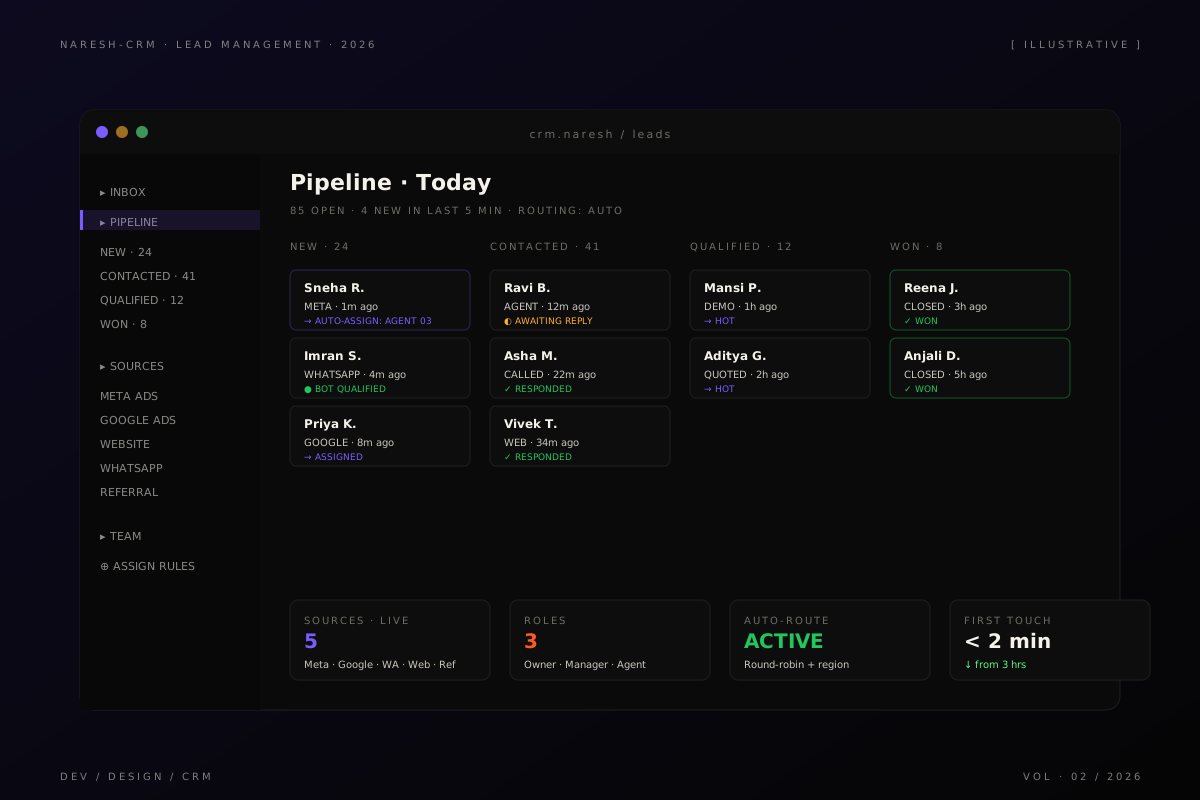
The team that needed one screen
The sales team was running on five tabs. Meta Ads Manager open in one. Google Lead Form Extensions in another. The website’s contact form going to a shared inbox somebody had to sort. WhatsApp sitting on someone’s phone. And a Google Sheet that ops kept “as a backup” because half the leads were getting lost in handoffs anyway.
When a lead came in, the path it took depended entirely on which surface it landed on. Some got a reply in fifteen minutes. Some sat for two days. The team’s manager couldn’t see the pipeline as one thing — only as five disconnected ones — so coaching, forecasting, and load-balancing all happened by gut.
I was brought in to fix this and given a single sentence as the brief: one screen, every lead, every source, every status.
Build or buy
The first real decision wasn’t technical. It was build vs buy.
The obvious move was Hubspot or Zoho. Both would have worked. Both would also have meant retrofitting the team’s actual organizational shape — a non-flat hierarchy with regional managers, role-based claim rules, and a manual “agent of the day” rotation — into the CRM’s mental model, not the other way around. I’ve seen teams spend a year configuring a SaaS CRM around their org chart and end up resenting both.
We chose to build because the integrations were custom anyway (the lead sources they used had specific webhook shapes), and because the assignment logic was specific enough that any off-the-shelf tool would have meant scripting around it indefinitely. The cost of writing the CRM ourselves was high once. The cost of working around someone else’s CRM is high forever.
How I thought about the design
The product is really three things wearing one skin:
- A lead intake pipeline — webhooks, polling jobs, manual entry — that all funnel into a single normalized lead schema. Source-of-truth is one row.
- A role and routing engine — owners can do anything, managers see their region, agents see their queue. Assignment happens automatically the moment a lead lands.
- A conversation surface — every interaction (call, WhatsApp, note) attaches to the lead, so the next person who picks it up isn’t starting from zero.
The trick was making all three feel like one product. The temptation when you have multiple modules is to give each its own home — its own dashboard, its own URL, its own filters. That’s how you end up with the five-tab problem the team was already fighting.
So everything lives in one shell. The pipeline view is the home. Filters drive what you see. Roles decide what you can see. There’s no “Inbox” page, no “Campaigns” page, no settings labyrinth. The CRM is one screen with smart defaults — and the rest is configuration that ops handles, not a navigational maze.
What I shipped
- A lead intake pipeline that ingests from Meta Lead Ads, Google Lead Form Extensions, web forms, the WhatsApp lead bot, and manual entry — all normalized into a single schema with deduplication on phone + email
- Role-based access — Owner, Manager, Agent — with a hierarchy that mirrors how the team actually works
- Auto-routing rules, editable by ops, that fire the moment a lead lands. Round-robin within region by default; overrideable per-source
- An audit log on every lead — who saw it, who claimed it, who replied, when
- An admin layer for users, roles, and integration credentials so ops can rotate keys and reassign coverage without filing a ticket
- A pipeline view that’s the home page — filters drive what you see, roles decide what you can see
Tech notes
- Next.js + TypeScript on the frontend, App Router with React Server Components
- Postgres for the lead store, Redis for the live pipeline counters
- Background workers for the polling jobs and webhook fan-out — separate from the request path so a slow Meta API doesn’t stall the UI
- Server-side conversion tracking back to ad platforms so the CRM closes the loop on ROAS
- A small DSL for assignment rules so ops edits “if region = Pune AND source = Meta then assign Agent 03” instead of editing code
What was harder than it looked
Webhook shapes. Every ad platform sends leads in a slightly different format, with slightly different timing guarantees, with slightly different idempotency stories. Meta retries aggressively. Google sometimes batches. Form leads arrive instantly but without context. We had to write per-source adapters and a single normalizer underneath, and we had to be defensive about duplicates because retries were the rule, not the exception.
The other quiet hard problem was hierarchy. Most CRMs assume a flat team or a strict org tree. Real sales teams have neither. They have regional managers who also take leads on Sundays. They have agents who escalate up and down based on deal size. The hierarchy is a graph, not a tree. So the role engine doesn’t ask “what’s your role” — it asks “what permissions does this user have on this lead right now,” and the answer can change by time of day.
Outcome
Sales operates from one screen instead of five tabs. Lead-to-first-touch time collapsed because routing happens automatically the moment a lead lands. Multi-platform fetchers mean nothing is lost between the ad and the conversation. The team’s manager can finally see the pipeline as one thing.
What I’d do differently
If I were starting again, I’d build the assignment-rule DSL first. The rules are the most-touched part of the CRM — ops re-tunes them every week — and we under-invested in their ergonomics in version one. Everything else was a one-time decision; routing rules are forever.