Education Platforms · ABS + NGI
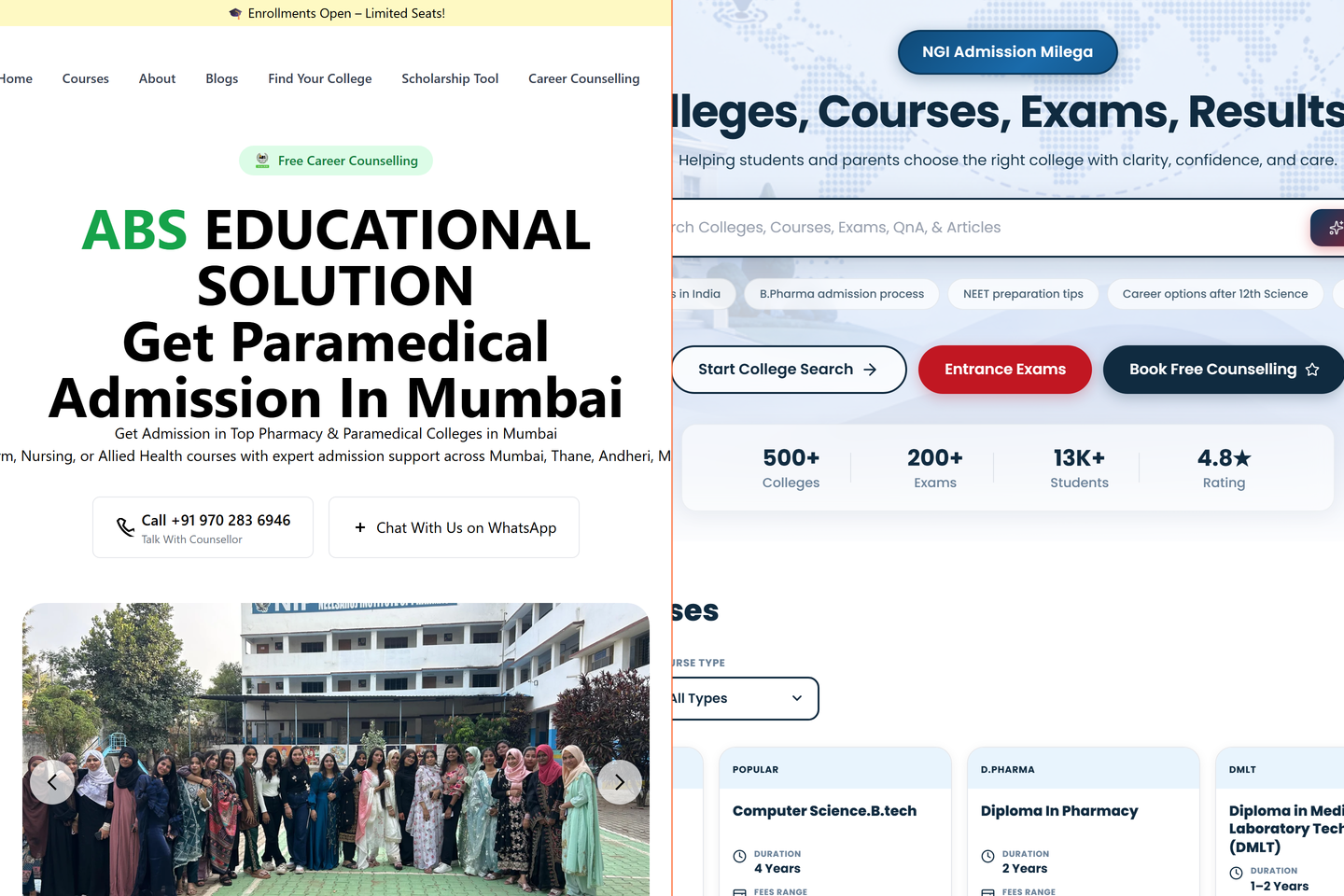
Two education platforms — abseducationalsolution.com and ngiadmissionmilega.com — content-managed sites with custom admin panels for lifecycle and admissions.
Two businesses, one set of constraints
Two parallel education businesses, run by overlapping teams, both needed sites. ABS Educational Solutions does counsellor-led admissions across courses. NGI’s admissionmilega.com is a more direct admissions-funnel play — match a student to a college, route the lead, follow up.
Different products. Different audiences. Same constraint: the team has to be able to publish content without filing an engineering ticket.
That sentence sounds banal until you’ve seen the alternative. I’ve worked with teams whose marketing manager has a 12-step Notion doc for how to publish a single new course page — open Figma, ping a designer, ping a dev, wait for staging, request a deploy, hope nothing breaks. The result: courses get added in batches, twice a year, and the team gives up on the site as a marketing surface.
The brief was to make sure that didn’t happen here.
The biggest decision: WordPress, on purpose
The honest version of this case study has to start with the stack choice, because it was contrarian.
I default to Astro / Next.js for sites I build. They’re faster, more secure, more pleasant to work in, and they produce better Lighthouse scores. For a personal portfolio, for a SaaS marketing site, for almost anything I’d build for myself — they’re the right answer.
For ABS and NGI, I chose WordPress.
The reason is simple: the team that would run the sites already knew WordPress. Two of them had used it on previous jobs. The admissions counsellors had seen colleagues at other institutions update WordPress pages. There was zero learning curve. There was a learning curve for every other CMS we considered.
The right stack is the one the team can actually maintain after I leave. A perfect Next.js site that engineering has to babysit forever is worse than a WordPress site the team runs themselves. Stack-fit for the team beats stack-fit for the engineer.
What the admin layer actually does
The team isn’t editing themes. They’re editing content — courses, faculty, news, admissions deadlines, scholarship terms. So the admin surface isn’t WordPress’s default. We built custom post types and meta fields so:
- Adding a new course is one screen with the fields the counsellor cares about (title, duration, fees, eligibility, application link) — not the kitchen-sink editor WordPress ships with
- Faculty profiles are their own post type with photo + bio + qualifications
- Admissions deadlines are pinned to a calendar view, not buried in a settings page
- Lead-form submissions route into the CRM via a small webhook — counsellors see them in the same place they see Meta and Google leads
The team can publish a new course in 90 seconds. Adding a new program — one with five sub-courses, full faculty, eligibility — takes maybe an hour. That’s the velocity number that mattered.
NGI · admissionmilega.com — different shape, same bones
ABS’s site is content-led. NGI’s site is funnel-led. The user lands on a hero that asks “what course are you looking for?” and 90 seconds later they’ve handed over a phone number and been matched with three colleges.
The structure is different but the spine is the same — same admin shape, same lead routing into the CRM, same WordPress core. We didn’t have to relearn anything between the two builds. That made site #2 substantially faster than site #1, and made future sites of this shape effectively a template question, not a build question.
What I shipped
- abseducationalsolution.com — public site, course catalog, faculty profiles, admissions intake, news / events
- ngiadmissionmilega.com — funnel-led admissions site optimized for organic intent
- A custom WordPress admin layer on both, with content types matched to how the teams actually think about their content
- Lead routing into the CRM — every form submission lands in the same pipeline as Meta, Google, and WhatsApp leads
- Schema markup, sitemap, OG / Twitter meta dialed in for SEO and AI-search visibility
- Mobile-first responsive layouts (the majority of the audience is on phones)
Tech notes
- WordPress on managed hosting (Hostinger), with a custom theme rather than a page-builder
- Custom post types via ACF Pro for content with structure
- A small Node service that bridges WordPress form submissions into the CRM (decoupled so the CRM can move stacks later)
- Cloudflare in front for caching and TLS
- Server-side rendered, no JavaScript SPA — the audience is on slow phones; we don’t ship JS we don’t need
What was harder than it looked
Lead deduplication. A single student often hits both sites in the same session — they Google, land on ABS, fill the form, then click an ad and land on NGI. Two leads, one person. The CRM had to recognize them as the same lead and merge — by phone, then by email, then by a fuzzy name match — without losing the channel attribution.
The other quiet problem was content migration. Both sites had ancestors — older sites with thousands of indexed URLs and SEO equity we didn’t want to lose. Every old URL got either kept or redirected. We didn’t break a single inbound link, and we didn’t lose ranking on the courses that were already pulling traffic.
Outcome
Two production sites the team actually owns. Admissions enquiries flow into one place. Content velocity went from “engineering needed” to “post and publish.” The team stopped treating the website as a static brochure and started using it as a marketing surface.
What I’d do differently
I’d ship the analytics dashboard at launch instead of three weeks later. The team’s instinct, once content velocity unblocked, was to publish more — but they didn’t have the data to know what was working. By the time the dashboard landed, three weeks of content had already gone live, and we couldn’t easily distinguish which patterns were converting. Measurement on day one would have made the next 90 days much sharper.